[ HOME ] > [ PERSONAL COMPANION ] > [ INDEX ] > EDIT EGG > ( EGG'S SPRITES )
You'll be able to change what the egg looks like here.
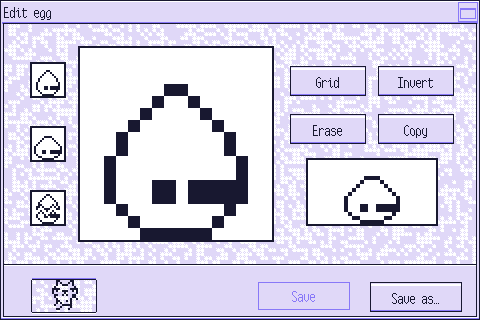
Press the image below to learn what each element does:
---
Press one of these sprites to edit it on the canvas.
If you press one of these while "Copy" is selected, this sprite will be copied
and it will overwrite the current one.
You can also right-click on one of them to use it as a guide.
This is the canvas.
Use the mouse's left button to draw and the right one to erase.
Press "Invert" to erase with the left button and draw with the right one.
Press this button to show or hide the grid.
Press this button to change what each of the mouse's buttons does on the canvas.
Press this button to clear the canvas.
Press this button when you want to copy one of the other sprites onto this one. Remember you have to press that sprite on the left side of the screen afterwards.
You'll see how the egg looks when it's animated in this window.
Press your PC to return to the egg edition menu.
Press "Save" to save all the data in this egg.
You cannot overwrite a default egg's data or the data of an egg currently in use.
Press "Save as…" to save this data to a new file.
You'll have to choose a name for it.
If you make a mistake, you can undo it with the key shortcut Ctrl + Z.
To redo, you can use the shortcut Ctrl + Shift + Z.
The game will forget the changes you've made if you change which sprite you're modifying,
so you won't be able to use these shortcuts if you do that.