
[ HOME ] > [ PERSONAL COMPANION ] > ( INDEX )
Hello! On this site I'll show you how to play my game: Personal Companion (for PC!)
PC2 is a virtual pet you can keep on your computer.
You'll be able to raise your own Personal Companion (PC), which will stay by your side as you work on
other things, if you want them to.
You'll need to download it first.
The link is right here:
The ZIP file you just downloaded has everything you need in order to play.
You just have to extract all of its files into the same folder.
If you want to access the game from a different location, you'll need to create a shortcut.
Run the app "Personal Companion (for PC!)" to begin playing.
There's another EXE file called "rftb". It just gets takes the game's icon off the taskbar
while it's minimized. You don't need to interact with it at all.
You'll see the game's logo the first time you run it. It won't show up when you open the game up after this.
First, you have to choose the language you want to run the game in. You can change it in the settings menu whenever you feel like it.
As soon as you've chosen a language, it's time to get your first egg.
Press on the egg you like the most and then click on "Choose".
Now, write a name for your new PC. You can change it later.
As soon as you've named the egg, it'll hatch!
Your new PC is here, so it's time to take care of them.
This first stage, "Baby I", is a little different to the others.
Your PC's heath won't get worse no matter how much you ignore them, so you can take your time to get to know the game's functions
you've got available.
This stage is just a tutorial.
To get them to grow, you have to [ feed them ] first.
Then, they'll catch bugs and you'll have to [ get rid of them ].
As soon as you heal them, your PC will grow and move on to the next stage: "Baby II."
You'll have to take care of them normally once they reach this second stage.
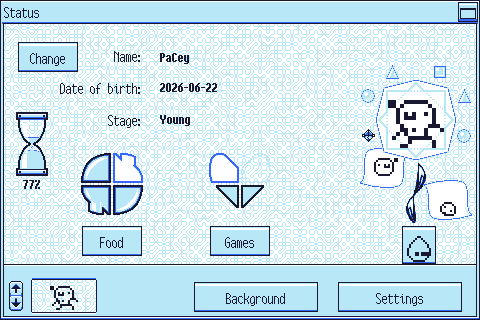
This is the main menu. You'll be able to see your PC's status here.
As well as seeing how they are doing, you'll be able to access all the care and settings functions from this menu.
Press on the part of the image below you'd like me to explain:
---
The minimize button.
Press it to minimize the care window and make the PC windows show up.
Double-click on one of the PC windows or press the game's icon on the system tray
to open the care window once again.
You can choose to have the PC windows not show up in the [ settings menu. ]
Your PC's name. Press the "Change" button to give them a new name.
Your PC's birth date. It'll be in the ISO 8601 standard. That would be "YYYY-MM-DD", where "YYYY" is the year, "MM" is the month, and "DD" is the date.
Your PC's current stage
These are all the stages:
· Egg
· Baby I
· Baby II
· Young
· Adult
· Special
This hourglass will tell you how much of the current stage your PC has already lived through.
When it gets to 100%, your PC will either grow or, if they can't grow anymore, have fully matured.
If you have an adult that has matured, your can press the hourglass to let them go live on their own.
The stomach will show you whether your PC is hungry or not.
At first, it'll only have room for two meals, but, if you feed your PC well, it may end up having room for four.
Press the "Food" button to feed your PC.
Not only will you be able to feed your PC, you'll also be able to [ cook. ]
Try feeding your PC several different kinds of food!
The food you make will be stored in the folder named "frigo" inside the folder with the game's data ("saveData.")
Since you can share these with other people, your PC will also be able to eat meals made by others!
You'll be able to know how happy your PC is by looking at this heart.
At first, it'll only have a capacity of two, but you can increase it to four if you play a lot with your PC.
Press the "Games" button to play with your PC.
You'll only be able to play one thing in the beginning, but you'll unlock more games eventually.
[ Press here to learn how to unlock each game. ]
Make sure to read each game's rules!
This flower will show you all the stages your PC has been through.
The shapes around it represent their health.
Every time your PC catches [ bugs ] from neglect, a figure will turn into one.
If every shape becomes a bug and your PC catches them again… you might lose them.
Press this button to see every egg you have.
You can choose a new one to raise it if you have an empty room.
Empty rooms can only be seen in this room.
You may also [ see each egg's data ] or edit them and make new eggs.
You have to raise a PC until they are fully mature and let them go in order to be able to edit eggs.
When you are editing eggs you can:
· [ Modify the egg's sprites. ]
· [ Modify the characters' sprites. ]
· [ Modify the food. ]
· [ Modify the characters' data. ]
· Export all the sprites to the "eggsport" folder.
· Import all the sprites from the "eggsport" folder.
Bear in mind that the imported images will be the ones with the same name and format as the ones exported.
The actual eggs are in the "huevos" folder. Share them!
Press this button to go to another room and care for you other PC.
You'll only be able to see the rooms with a PC in them here.
In order to see the empty rooms, you'll have to press the egg button first.
You'll only have one room at first. You'll get two more as soon as your first PC becomes an adult.
Your PC!
Pressing here now won't do anything.
But you can press on your PC when you are in other menus to return to the previous one.
Press here to [ change this room's background. ]
Press here to [ change the settings. ]
This game was made by me (curlour,) but two people have helped me make sure it works well (enough.)
They also designed the characters of two of the eggs that come with the game. They are: