[ HOME ] > [ PERSONAL COMPANION ] > [ INDEX ] > EDIT EGG > ( CHARACTER DATA )
You'll be able to see and modify the characters' data here.
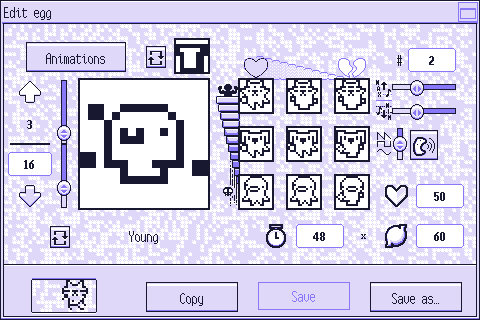
Press the image below to learn what each thing does:
---
Press this button to change this character's [ animations. ]
The food this character will make if you hit "Let the PC do it!" in the kitchen. Press the button to the image's left to change it.
You'll be able to change the character using the arrows.
Press the upper arrow to see the next character and the lower one to see the previous character.
The upper number displays the current character and the one below shows how many characters there are in total.
If you lower this number, the last characters will be removed. If you increase it, default characters will be
added to the end of the list.
There are two sliders here.
Use the one above to change which head this character uses
and the one below to change which body they use.
If you lower it completely, they won't have that part.
What the current character looks like.
The pose they have here is the one they have in the first frame of their
idle [ animation. ]
Every character the current one can turn into.
If you press one, you'll get a window asking you for the number of the character you
want this one to become if they get the corresponding level of care.
You may write "0" to make that space blank. This is what you have to do to stop a character from growing any more.
This is how many times this character will call when they need something.
You can change the calls' pitch here.
Use the slider above to change the highest possible pitch and the one below to change the lowest one.
Each call will have a pitch between these two.
You'll be able to change what kind of wave this character calls with here.
Press this button to hear what this character sounds like when they call for help.
This character's stage.
Press the button to its left to change it.
Bear in mind each egg can only have one character in each "baby" stage. You'll only be able to pick
between the young, adult and special stages.
Change this number to determine how long the stage is for this character.
A PC's progress in their life is linked to their stomach, so this number represents
how many times their stomach has to deplete before the stage is over.
Change this number to determine how long it takes (in minutes) for this character to get hungry.
Change this number to determine how long it takes (in minutes) for this character to get sad.
Press your PC to return to the egg edition menu.
Press this button to copy this character's data to another one.
You'll have to select the data you want to copy, write the number of the character you want to
copy it to and press the arrow button between the numbers of both characters.
You cannot copy or overwrite the first character's ("Baby I") data.
Press this button to save all the data in this egg.
You cannot overwrite a default egg's data or the data of an egg currently in use.
Press this button to save this data to a new file.
You'll have to choose a name for it.